Cadence vs. Microsoft Project.
A line-by-line comparison. Where Cadence matches, where it differs, where Project still leads.
Familiar, but not built for serious CPM.
Microsoft Project is the tool almost everyone has opened at least once. It is widely deployed, sits inside the Microsoft 365 / Teams / SharePoint world that organizations already run on, and carries decades of templates, add-ins, and familiarity. For a task list everyone recognizes, it is hard to beat, and this page does not pretend otherwise.
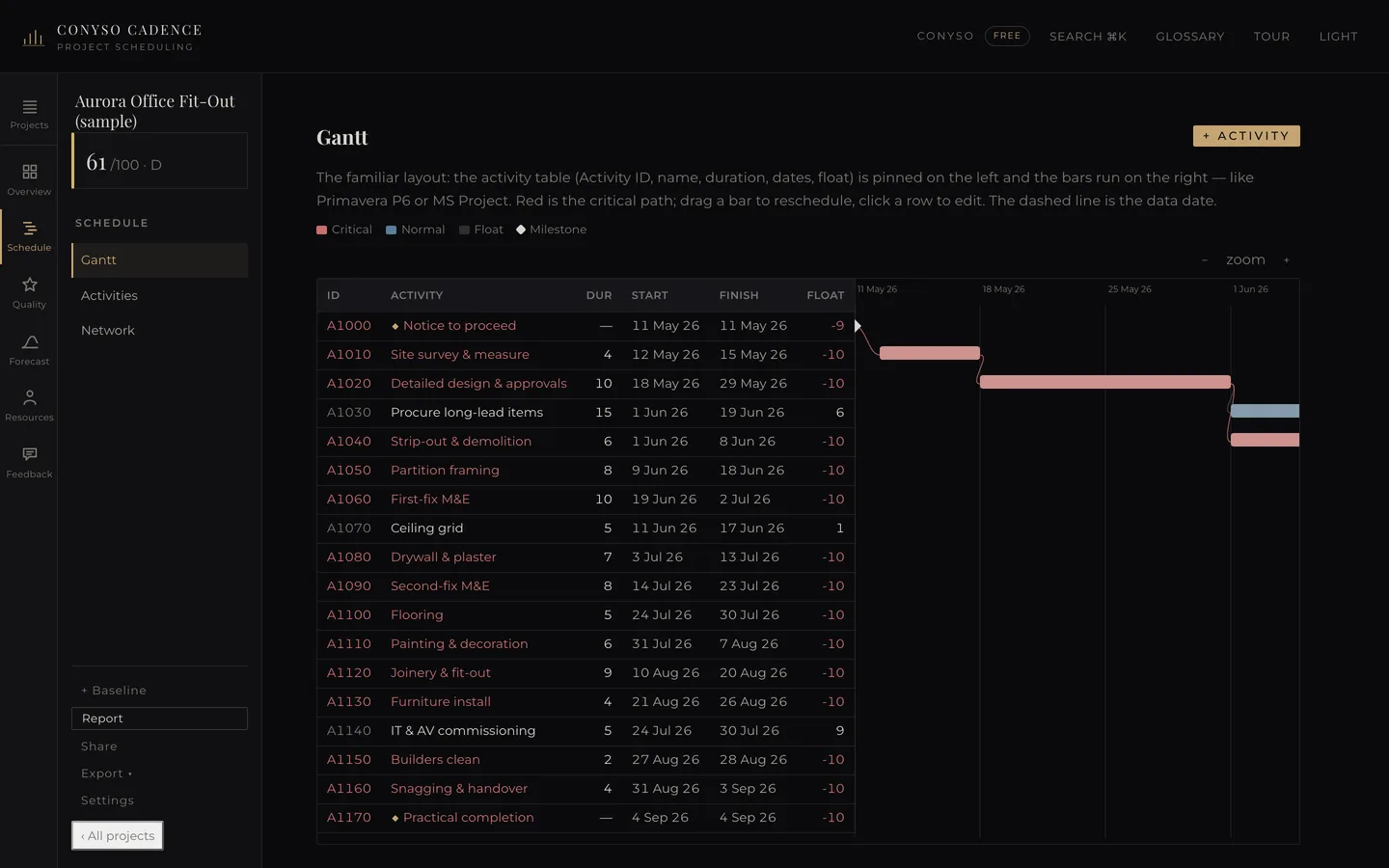
For serious scheduling the picture is different. Real critical-path quality checks, a DCMA score, and Monte-Carlo risk all live in third-party add-ins around Project, not in the box. The desktop product is Windows-centric, while Project for the web is a separate, lighter product. Files are .mpp and XML that need a license to open. Cadence gives a real CPM engine, a built-in DCMA audit, Monte-Carlo risk, earned value, and forensic delay analysis, free, in any browser, on open formats. The trade-offs are real in both directions. This is the map.
Six wins that aren't about familiarity.
Free & open
Free in your browser, against a paid Microsoft 365 / Project subscription. No seat math, no Microsoft account, no Windows requirement.
Browser-native
Any modern browser, or one docker run behind your own firewall. No desktop install, and not split between a heavy Windows app and a lighter web product.
DCMA audit built in
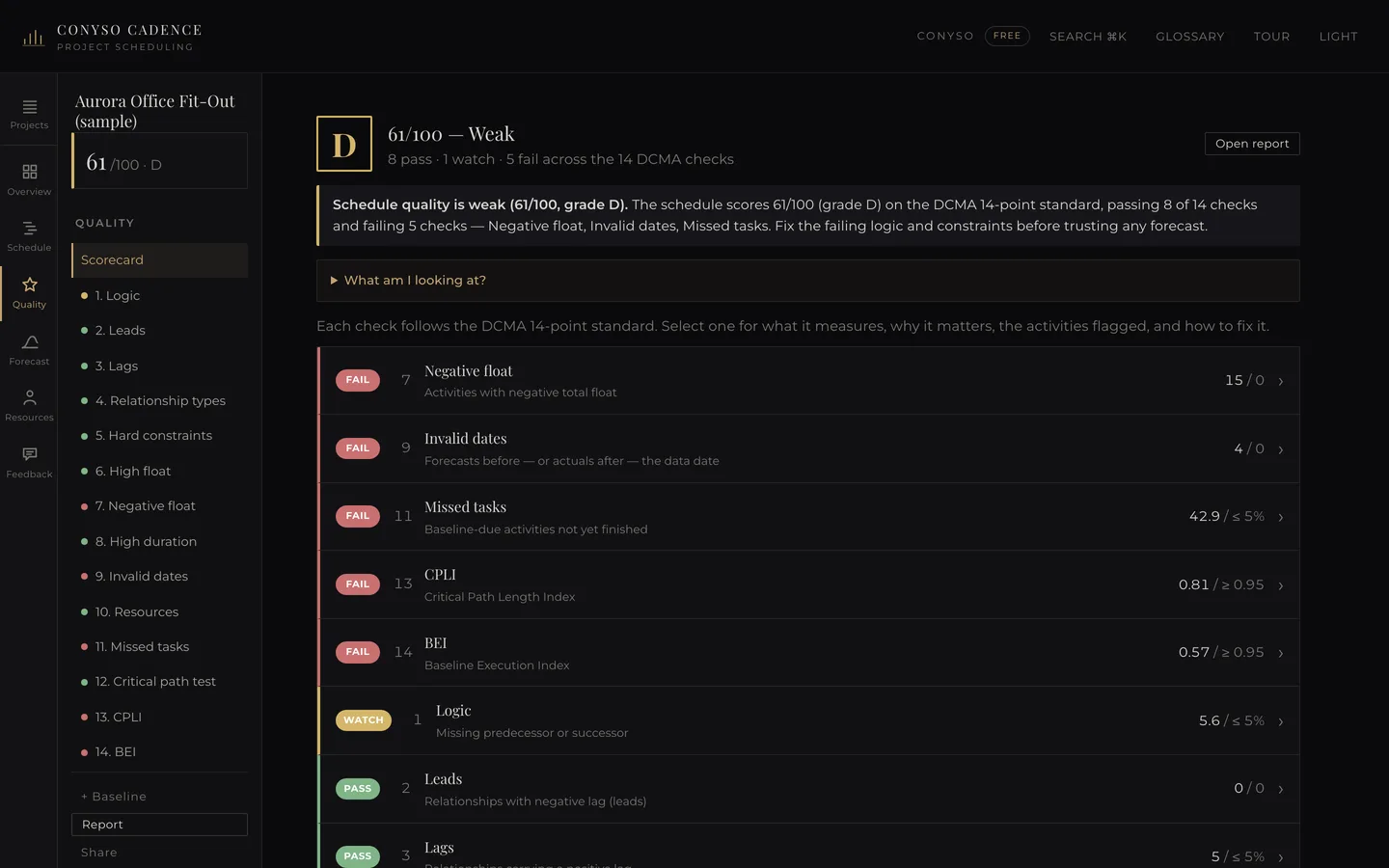
The 14-point schedule-quality assessment, scored 0 to 100 with per-check findings, shipped in the box. Around Project that audit needs a separate add-in.
Risk & delay, included
Seeded Monte-Carlo risk and forensic delay analysis are built in. With Project, Monte-Carlo means a third-party add-in such as @RISK or Full Monte, and delay work is manual.
Deterministic & reproducible
A pure-function engine recomputed on demand, seeded risk, 43 automated tests, and source you can read. Same inputs, same outputs, every time, with no AI in the math.
Open formats & sharing
Reads and writes MS Project XML and .xer, exports open JSON, and mints a read-only share link or a self-contained HTML report. Your file is never held hostage.
What it costs to get started.
Cadence
docker run- Free in your browser, forever
- Self-host with one
docker run, no cost - Self-hostable; your data stays in-house
- Your schedules stay in-house when self-hosted
- No login, no seats, no telemetry
Microsoft Project
- Project desktop is Windows-centric
- Microsoft account required
- Closed-source, commercial
- Project for the web is a separate, lighter product
- Part of the wider Microsoft 365 stack
Scheduling capability, side by side.
| Capability | Cadence | Microsoft Project |
|---|---|---|
| Cost & access | ||
| Price | FreeFree in the browser, self-hostable, no seats | SubscriptionA paid Microsoft 365 / Project subscription |
| Platform | Any modern browser | Windows desktopProject for the web is a separate, lighter product |
| Self-hosting | One docker run |
NoDesktop install or Microsoft-hosted cloud |
| Login required | None | Microsoft account |
| License | Perpetual self-host license | Commercial, closed |
| Critical-path engine | ||
| Relationship types | All four (FS / SS / FF / SF) | All four (FS / SS / FF / SF) |
| Lags & leads | Yes | Yes |
| Date constraints | Yes | Yes |
| Total & free float | Both, reported clearlyTotal and free float surfaced on every task | BothComputed, but less surfaced in the default view |
| Cycle (loop) detection | Yes | Yes |
| Per-activity calendars | YesPart-time, six-day, or 24/7 working calendars per activity | Yes |
| Familiar UX & switching cost | ||
| Pinned activity table + Gantt | YesA pinned spreadsheet of activities beside the Gantt, the layout schedulers expect | Yes |
| Activity IDs & type-able predecessors | YesActivity IDs (A1000) and predecessors typed the P6 way (A1010FS+2) | Row-number styleTask IDs and predecessors by row number, not P6 Activity-ID relationship strings |
| Right-click menus, Tab-to-indent WBS | Yes | Yes |
| Interactive network logic editor (drag-to-link) | YesBuild relationships by dragging one activity to another | Network Diagram view |
| Switching cost / retraining | Near-zeroFamiliar muscle memory; the same way to schedule, minus the license | N/A, the incumbent |
| Resource management | ||
| Resource leveling | Yes | Yes |
| Loading curves | Yes | Yes |
| Time-phased availability | Yes | Yes |
| Schedule risk | ||
| Monte-Carlo, built in | Yes, seeded & reproducibleIn the box; same seed, same result, every time | NoNeeds a third-party add-in such as @RISK or Full Monte |
| P10 / 50 / 80 / 90, S-curve, tornado, criticality | YesConfidence percentiles, S-curve, tornado, and criticality index | In an add-in |
| Integrated cost risk | Yes | In an add-in |
| Earned value | ||
| SPI / CPI / EAC | Yes | Basic EVM fieldsCore earned-value fields exist, less complete than a dedicated read |
| PV / EV / AC curves | YesAgainst a baseline, on the same screen as the schedule | Tables, limited curves |
| Schedule quality audit (DCMA 14-point) | ||
| Built-in 0 to 100 score | YesAll 14 checks scored 0 to 100, in the box | NoNeeds a separate add-in such as Acumen Fuse |
| Per-check findings & fix guidance | YesPlain-language verdict per check, with the exact tasks to fix | No |
| Forensic delay analysis | ||
| TIA / but-for / windows | Built inTime Impact Analysis, collapsed as-built (but-for), and windows, the AACE 29R-03 family | NoManual, or a separate forensic tool / engagement |
| Schedule comparison / diff | YesDiff two .xer: finish movement, quality change, slips, scope churn |
Compare-versions add-in |
| Openness & sharing | ||
Import .xer |
Yes | Via conversionNot native; needs an intermediate XML / converter |
| MS Project XML in / out | Yes | Yes |
| Open JSON export | YesPlus CSV; the whole schedule in a format anything can read | No |
| Read-only share link | Yes | Via the cloud product |
| Self-contained HTML report | YesOne file the client opens without a license | No |
| Trust & determinism | ||
| Deterministic recompute | YesPure-function engine recomputed on demand, no stale cache | Recalculation engine |
| Plain-English interpretation | YesVerdicts, findings, and an executive summary, rule-based from the computed numbers | No |
| No-AI math | YesEvery number is deterministic; nothing a model invented | Deterministic |
| Self-hostable | Self-host licenseRuns on your own infrastructure | Closed |
| Automated tests | 43, published | Internal, unpublished |
| Ecosystem & integration | ||
| Ubiquity & familiarity | New (2026) | YesAlmost everyone has used Project at least once |
| Office / Teams / SharePoint integration | NoIntegrates by reading and writing open files instead | YesDeep ties into Microsoft 365, Teams, and SharePoint |
| Cloud portfolio & resource management | Single-tenantBuilt for a serious CPM programme, not an organization-wide portfolio | YesProject Online / Project for the web at organization scale |
| Multi-user cloud co-authoring | Single-tenant | YesIn the cloud product |
| Template & add-in ecosystem | Open formats | VastA large market of templates and add-ins |
| Installed base & years | New (2026) | DecadesDeep installed base and familiarity |
Where Project still wins.
Project's strongest card is reach. Almost everyone has used it, it is widely deployed, and it sits inside the Microsoft 365, Teams, and SharePoint world that most organizations already run on. For a simple task list everyone recognizes, that familiarity is real value, and Cadence does not try to replace it.
The cloud side, Project Online and Project for the web, also brings organization-scale portfolio and resource management and multi-user co-authoring that Cadence, single-tenant by design, does not. Add a vast template and add-in ecosystem and decades of installed base, and Project remains the default many teams reach for. Cadence is new, and honest about that.
Where Cadence wins.
Cadence is free, browser-native, and self-hostable, with one docker run to self-host behind your own firewall. The DCMA 14-point audit, seeded Monte-Carlo risk, earned value, and forensic delay analysis are all built in, where the Project world splits those across third-party add-ins such as @RISK, Full Monte, or Acumen Fuse.
It reads and writes open formats (MS Project XML, .xer, JSON, CSV), mints read-only share links and self-contained HTML reports, and every number is deterministic and reproducible, backed by 43 published tests. You can audit a submitted schedule, forecast a finish date, or self-serve a delay analysis without a license, an install, or a Microsoft account.
When to use which.
Use Microsoft Project when
You want Office and Teams integration, organization-wide portfolio and resource management, multi-user cloud co-authoring, or a simple task list that everyone already knows. That familiarity and ecosystem are what it is built for.
Use Cadence when
You need a real CPM programme with a DCMA score, Monte-Carlo risk, earned value, and delay analysis, free, in a browser, on open files. Author, level, score, and forecast a schedule, or audit a submitted one in seconds.
Use both when
Cadence reads and writes MS Project XML, so the two coexist. Keep Project for the day-to-day and the Office integration, and bring the schedule into Cadence to score it, run risk, or build a delay analysis, then export it back.
Open a real schedule in ten seconds.
Comparison written by Conyso Labs, 2026. Microsoft Project is a trademark of Microsoft Corporation. This page is not affiliated with or endorsed by Microsoft.
Questions, answered.
Is Cadence a free alternative to Microsoft Project?
Yes for critical-path scheduling, resource levelling, earned value and a DCMA 14-point schedule audit, free in the browser, and it imports MS Project XML. MS Project has broad task management and Office integration; Cadence focuses on the critical path and schedule quality without a licence.
Can I import my MS Project file?
Yes. Cadence reads MS Project XML and Primavera .xer, and exports open formats plus a share link.
Does Cadence audit schedule quality?
Yes, against the DCMA 14-point standard, 0 to 100 with a verdict per check, which MS Project does not do out of the box.
Is there anything to install?
No. It runs in the browser free; self-host for a one-time licence.
When is MS Project the better fit?
For general task and resource management inside the Microsoft ecosystem. Cadence is for forensic critical-path scheduling and a DCMA audit.